














Smart Baby Gear: A Practical Guide for Busy Parents
Choose smart baby monitors, lights and home devices with care. Learn what they can do, where their limits lie, and how to protect your baby and data.

On this page
- What counts as smart baby gear?
- Start with the task you want help with
- Smart monitors: what they can and cannot do
- Comparison: common smart baby gear
- Safe sleep comes before smart features
- Place devices and cords safely
- Privacy and account security
- Power, internet and backup plans
- Smart lights, sound and room sensors
- Choose by age and stage
- Common mistakes to avoid
- How to compare products before buying
- Official guidance across four countries
- Frequently asked questions
- A simple plan for a calmer home
- Sources
Short answer: Smart baby gear can make some daily tasks easier. A monitor may let you hear or see your baby from another room. A smart light can be switched on without finding a wall switch. A phone alert may remind you about a task. These tools do not care for a baby, prevent every accident, or replace safe sleep advice. Choose gear for a clear need. Check how it works without internet or power. Keep cords, small parts, and devices away from your baby.
Families in Australia, the UK, the US and Canada can use the same basic approach: follow local safety advice, check product recalls, and treat health claims with care. Smart gear is optional. A simple, well placed monitor or lamp may suit your home better than a system with many connected parts.
What counts as smart baby gear?
Smart baby gear is a broad name for baby or home products that use sensors, apps, wireless links, or automatic controls. Some products send sound or video to a phone. Others track room conditions or let you control lights from an app. Some connect several devices through one home system.
The word “smart” does not tell you whether a product is safe, useful, or accurate. Read what the device actually does. A room thermometer measures the room near its sensor. It does not tell you whether your baby is too hot. A camera shows an image. It does not show every risk in the cot. An app may count movement or sound. That count may not explain why your baby moved or cried.
Common types include:
- Audio monitors: send sound from a nursery unit to a parent unit or phone.
- Video monitors: add a camera view, sometimes with night vision or two-way sound.
- Room sensors: report temperature, humidity, or light near the sensor.
- Smart lights: turn on, dim, or change colour through a switch, app, or voice control.
- Connected appliances: include items such as air cleaners or humidifiers controlled by an app.
- Wearable trackers: attach to clothing or a body and claim to record movement or other readings.
These products have different jobs. A monitor can help you hear a baby who is settling in another room. A light can help an adult see during a feed. Neither is a substitute for checking your baby in person.
Start with the task you want help with
Busy parents often face a long list of products and features. Start with one daily problem. Then decide whether a device can safely help with that problem.
- If you need to hear a baby from another room, consider a basic audio monitor.
- If you need a view while you are nearby, a video monitor may help. Keep it outside the cot and out of reach.
- If night feeds are hard, a simple lamp with an easy switch may be enough.
- If you want to know the room temperature, use a separate room thermometer placed away from heat or sunlight.
- If you want reminders, a phone alarm or paper list may be easier than a new connected device.
Ask who will use the device. A parent may prefer a dedicated screen. Another caregiver may prefer a phone app. Check whether several carers can access it safely. Decide who receives alerts and who can change settings.
Think about your home, too. Thick walls may weaken a wireless signal. A crowded network can affect a connected camera. A small flat may not need a long-range monitor. A shared home may need clear rules about who can watch the camera feed.
Smart monitors: what they can and cannot do
A baby monitor carries sound or video from one place to another. It can help a caregiver hear a baby while doing a nearby task. A camera can help the caregiver see whether the baby is awake. The caregiver still needs to respond in person.
Consumer monitors do not make a sleep space safe. They cannot prevent sudden infant death. They cannot replace the advice to place a baby on their back, in a clear, safe sleep space. They may miss an event or send a false alert. A phone may be muted, out of range, or out of battery.
Some products claim to track breathing, oxygen, heart rate, or sleep. These claims can sound reassuring. But consumer devices may not be medical equipment. Their readings may be wrong or hard to interpret. A normal reading cannot prove that a baby is safe. An unusual reading can cause alarm without showing what is wrong.
For a healthy baby, ask a health professional before relying on a monitor for health checks. If a baby has a medical condition, follow the care plan from their clinician. Use only equipment and settings they recommend. Do not change care because an app says all is well.
Choose a monitor that fits your routine
Compare the basics before paying for extra features. Check whether the monitor works locally, through a home network, or through the internet. “Local” means the parent unit connects directly to the nursery unit. An internet connection may let you view the camera away from home, but it also adds setup and privacy questions.
Look for clear instructions about setup, sound, charging, mounting, and cleaning. Check whether the camera needs to be fixed to a wall or placed on furniture. Follow the maker’s distance instructions. Keep the camera, power lead, and any straps well outside the cot. Cords can strangle a child if they are within reach.
Try the monitor before relying on it. Walk to the places where you usually work. Check the signal, sound level, and battery. Ask another caregiver to test it, too. Have a simple backup plan if the monitor stops working.
Comparison: common smart baby gear
| Type | May help with | Limits to remember | Safety checks |
|---|---|---|---|
| Audio monitor | Hearing a baby from another room | It cannot show what is happening. Sound can drop out. | Keep cords away from the cot. Test range and battery. |
| Video monitor | Seeing whether a baby is awake or moving | It shows only its camera view. It does not prevent harm. | Secure it out of reach. Use a strong account password. |
| Room thermometer | Checking the air near the sensor | It does not measure a baby's comfort or health. | Place it away from sun, heaters, and vents. |
| Smart light | Making low light easier to control | App or voice control may fail. Bright light can disturb sleep. | Keep cords and lamps away from the sleep space. |
| Air cleaner | Filtering some particles when chosen and used correctly | It does not remove every indoor pollutant or replace fresh air guidance. | Follow room size and filter instructions. Avoid unsafe placement. |
| Wearable tracker | Recording a claimed movement or body reading | Readings may be inaccurate and can cause false reassurance or worry. | Ask a clinician before using for medical decisions. |
| App reminders | Remembering feeds, supplies, or shared tasks | Entries depend on people recording them correctly. | Limit who can see family information. |
There is no single best choice for every family. Pick the simplest tool that does the job. If a feature adds more alerts, setup, or worry than help, leave it unused or choose another product.
Safe sleep comes before smart features
Smart devices can sit near a sleep space, but they do not change the safe sleep basics. Use a cot, crib, or bassinet that meets the rules where you live. Follow its instructions. Place your baby on their back for sleep. Keep the sleep space clear of loose items. Use a firm, flat mattress made for that sleep space.
Do not add a sleep positioner, inclined product, pillow, or soft item because an app or monitor suggests it. Do not attach a monitor, strap, or cable to the cot. Keep camera leads and power cords well beyond your baby's reach. Check the cot and device each time you move or adjust equipment.
A monitor cannot make bed-sharing, a sofa, or an unsafe sleep product safe. It also cannot watch every angle. A caregiver should check the baby directly as part of normal care.
For local advice, Australia has Red Nose and Product Safety Australia. The UK has the NHS and The Lullaby Trust. In the US, the Consumer Product Safety Commission (CPSC) covers product safety, while the American Academy of Pediatrics (AAP) offers health guidance. In Canada, Health Canada and the Canadian Paediatric Society provide safety and health information.
Place devices and cords safely
Many smart products use a cable, plug, battery, stand, or wall mount. These parts can create risks if a baby can reach them. Set up devices before the baby starts rolling or crawling. Then check the setup again as your child grows.
- Keep every monitor cord far from the cot, bassinet, or play space.
- Do not drape a lead over a cot rail or place it under a mattress.
- Secure wall-mounted devices as the maker directs. Check that the mount stays firm.
- Keep plugs, power boards, and chargers away from wet areas and small children.
- Use battery covers and keep loose batteries out of reach.
- Check products for cracks, loose parts, heat, or damage.
- Stop using a device if its cord, plug, battery, or casing is damaged.
Button batteries are small, round batteries found in some remote controls, sensors, and lights. If swallowed, they can cause severe internal burns. Choose products with secure battery compartments. Store spare batteries safely. Follow emergency advice at once if you think a child has swallowed one.
Do not leave a charging device on bedding or near a baby. Use the charger supplied or one the maker says is suitable. Charge batteries in a place where children cannot reach them. Follow local advice for damaged or unwanted rechargeable batteries.
Privacy and account security
A connected camera or sensor may send data through the internet. Before setup, find out what data the device collects and who can see it. Read the privacy settings and the account rules. You do not need to share more than the device needs to work.
- Use a unique password that you do not use for other accounts.
- Turn on extra sign-in checks if the service offers them.
- Give access only to people who need it. Remove old users when care arrangements change.
- Install updates from the maker. Updates can fix faults and security problems.
- Turn off remote viewing if you do not need it.
- Do not share camera links or passwords in group chats.
- Check whether the device still works if the maker ends app support.
Think about where a camera points. Avoid filming visitors, shared spaces, or areas where family members expect privacy. Tell other caregivers how the device works. Agree on when it is on and who can view it.
Security rules differ by country and can change. Australia’s Department of Home Affairs gives information about smart device security. The UK government explains security rules for connected products. Canada’s Get Cyber Safe shares practical advice for connected baby gear. In the US, the Federal Communications Commission provides information about its Cyber Trust Mark.
Power, internet and backup plans
A connected device can fail when a router, phone, battery, or power supply stops working. Plan for that before you need the monitor. Keep the nursery unit charged if it uses a battery. Know how to hear your baby without an app. A caregiver can also check in person at regular times.
Check which features work offline. Some devices keep playing sound when the internet is down. Others need a connection for every alert. Test this by reading the instructions and trying the device before relying on it. Do not test during a time when the baby needs care.
If power loss could affect a medical device, ask the child's clinician and local power provider about a plan. Ordinary baby monitors are not life support. Do not treat them as emergency equipment.
Keep a spare way to contact another caregiver. If an app update changes the controls, learn the new steps before using it overnight. Keep essential instructions somewhere adults can find them.
Smart lights, sound and room sensors
A dim light can help an adult see during a feed or nappy change. Choose a light that is easy to switch on and off. Keep it away from bedding and fabric. Avoid shining a bright light into a baby's eyes. A phone screen can also be bright, so lower its brightness when checking an alert at night.
Some families use sound machines. Keep the machine away from the baby's head and use a low volume. Do not use loud sound to cover every household noise. If you use a product that plays sound, follow its distance and volume instructions. Stop if it seems to upset the baby or makes it harder to hear them.
Room sensors can help you notice changes in the air near the device. They do not tell you what your baby feels. Place a sensor where it measures the room, not beside a heater, window, or sunny wall. Follow local health advice about room comfort and clothing.
An air cleaner may reduce some particles when used as directed. It does not replace fixing a pollution source or following health advice during smoke events. Check the filter type, room guidance, and replacement needs. Do not assume an app colour or score proves the air is safe for a baby.
Choose by age and stage
As a baby grows, the same device may need a new place or may no longer be useful. Check the manufacturer's age and use instructions. Your baby's skills matter as much as their age. A child who can reach, pull, or climb needs a different room setup.
| Stage | What may help | What to check |
|---|---|---|
| Newborn | A basic monitor may help a caregiver hear the baby nearby. A simple lamp may help with night care. | Keep sleep space clear. Put all devices and cords out of reach. |
| Rolling baby | A monitor may help you hear activity while you are close by. | Recheck every cord, mount, and nearby surface. Keep the cot safe and clear. |
| Crawling baby | Room controls may help adults manage lights or reminders. | Move chargers, plugs, batteries, and loose devices higher or behind barriers. |
| Toddler | A night light or sound monitor may suit some homes. | Secure furniture and devices. Keep cords and small parts away from climbing hands. |
Do not keep using a product after your child has outgrown its intended use. Follow the age, weight, and setup directions. Check product recalls when you buy new or second-hand gear.
Common mistakes to avoid
- Buying features before naming the need. Decide what task you want help with first.
- Treating an alert as a diagnosis. A consumer device cannot explain a baby's health.
- Trusting a monitor instead of safe sleep. Use the sleep space and routine recommended by local health guidance.
- Leaving cords near the cot. A cord can become dangerous as a baby grows and reaches.
- Assuming internet access is private. Set a strong password and limit account access.
- Ignoring battery and charger safety. Check covers, cables, heat, and damage.
- Using too many alerts. Keep only alerts that help you take a clear action.
- Skipping a backup plan. Know how to check your baby if the phone or network fails.
- Keeping old gear without checking it. Look for damage, missing parts, support information, and recalls.
How to compare products before buying
Read the full product description and the user guide. Look for the maker's name, contact details, instructions, power needs, and age limits. Check whether the app needs a paid plan or internet access. Find out how updates and repairs work.
Search the official recall site for your country. A product that looks new may still be recalled. If you buy used, ask for the model name and instructions. Do not use gear with missing parts, damaged cords, or unclear history.
Be cautious with broad claims such as “medical grade,” “prevents danger,” or “never miss a moment.” Ask what was measured, how the device was checked, and whether the claim applies to your baby. If the maker does not explain, do not rely on the claim.
Compare the total effort, not just the feature list. A device needs setup, charging, cleaning, updates, and account care. A simple tool that works every day may be more useful than a complex system that creates extra tasks.
Official guidance across four countries
Product rules and health advice are not identical in every country. Check the local regulator and health body before buying or using equipment. These groups are useful starting points:
| Country | Product safety and recalls | Health and safe sleep advice |
|---|---|---|
| Australia | Product Safety Australia and the Australian Competition and Consumer Commission (ACCC) | Red Nose and Pregnancy, Birth and Baby |
| United Kingdom | Office for Product Safety and Standards (OPSS) | NHS and The Lullaby Trust |
| United States | Consumer Product Safety Commission (CPSC) | American Academy of Pediatrics (AAP) |
| Canada | Health Canada | Canadian Paediatric Society |
Check the guidance for the type of product you are buying. A monitor is not the same as a cot or a medical device. If a product has a health feature, ask a health professional whether it suits your child.
Frequently asked questions
Do I need a smart baby monitor?
No. A monitor is optional. Some families find one useful for hearing a baby from another room. Others prefer to stay close or use a basic audio monitor. Choose what suits your home and routine.
Can a smart monitor prevent sudden infant death?
No consumer monitor can promise that. Follow safe sleep advice from your local health body. Keep the sleep space clear and check your baby directly.
Are breathing or oxygen monitors accurate?
Consumer devices may not give reliable medical readings. They can miss a problem or raise a false alarm. Ask your baby's clinician before using one for health decisions.
Where should I put a video monitor?
Follow the maker's instructions. Fix it securely and keep it, its stand, and every cord beyond your baby's reach. Never attach a monitor or cable to the cot.
Is a Wi-Fi monitor safe to use?
It can be used with care. Set a unique password, limit account access, install updates, and turn off features you do not need. Check what information the app collects.
What should I do if the monitor loses power or signal?
Check your baby in person. Use a backup way to hear or check on them. Do not depend on a phone alert as the only way to know your baby needs care.
Can a smart thermometer tell me if my baby is too hot?
It reports the air near its sensor. It does not measure your baby's body or comfort. Follow local advice about clothing and room conditions, and check your baby directly.
Should I buy a wearable sleep tracker?
Only if you understand its limits and have a clear reason. Do not use it to diagnose a health problem or change care without advice from a clinician.
How often should I check the device setup?
Check it when you install the device, after moving furniture, and as your baby learns to roll, reach, crawl, or climb. Look at cords, mounts, batteries, and account access.
A simple plan for a calmer home
Start with a safe sleep space and a clear care routine. Add one device only if it solves a real problem. Read the instructions, secure the device, and test it before relying on it. Keep cords and batteries away from children. Protect the account and make a backup plan for power or internet loss.
Smart gear can support a caregiver. It cannot take the caregiver's place. A direct check, a safe setup, and clear advice from trusted health bodies remain the best foundation.
Disclaimer: This article is general information, not medical advice. Ask a qualified health professional about your baby's health or care. Product features and rules can change, so check the maker's instructions and your local safety regulator. Some links on this site may be affiliate links. We may earn a commission if you buy through them, at no extra cost to you.
Sources
- Red Nose Australia – Baby monitors
- Children's Hospital of Philadelphia – Consumer baby monitors have little proven benefit for healthy infants (2017)
- Product Safety Australia – Button batteries guide
- U.S. Consumer Product Safety Commission – Infants and toddlers can strangle in baby monitor cords (Publication 5066)
- Get Cyber Safe (Government of Canada) – Cyber security tips for your baby gear
- UK Government – Security rules for smart devices (PSTI)
- Australian Department of Home Affairs – Security standards for smart devices
Related guides
More Gadgets & Electronics →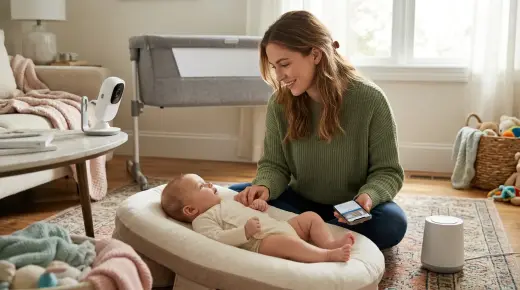
Budget-Friendly Smart Baby Gear: What Helps, What to Skip, and How to Choose

Useful Baby Gadgets: A Safe Gift Guide for New Parents

Baby Gear for Modern Families: What Helps, What to Check, and What to Skip
