














Budget-Friendly Smart Baby Gear: What Helps, What to Skip, and How to Choose
Choose useful baby gadgets on a budget. Compare monitors, lights, sound machines and smart gear, with simple safety advice for four countries.
On this page
- Start with your family's actual needs
- What “smart” means, and what it does not mean
- Baby monitors: choose for the room and the task
- Lights and sound machines
- Simple comparison of common gadgets
- Buy the safety basics before extra gadgets
- Age stages: how needs can change
- Privacy and device security in plain words
- Common mistakes to avoid
- Safety guidance in four countries
- A simple budget plan
- Frequently asked questions
- Sources and further guidance
- Sources
Short answer: A useful baby gadget solves a real problem for your family. Start with the basics. Choose safe sleep, feeding and travel gear first. Add a monitor or other device only if it helps with daily care. A phone connection, sensor or app cannot replace an adult's care. It also cannot make an unsafe sleep space safe.
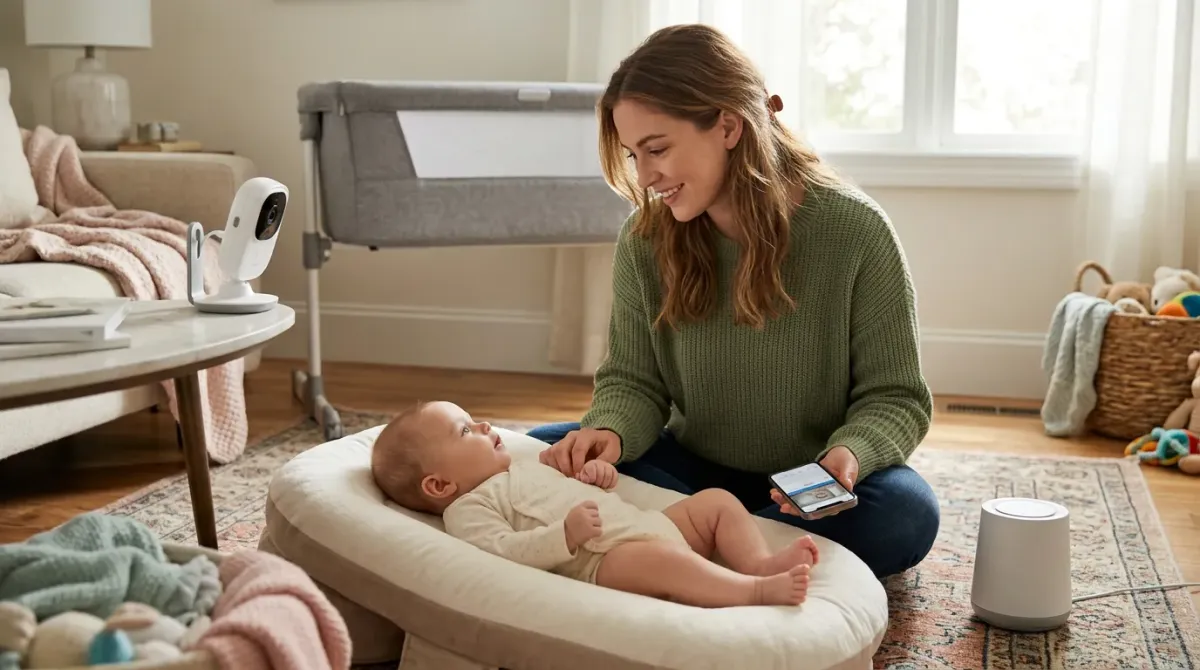
Smart baby gear can include a video monitor, a sound machine, a night-light, or a connected thermometer. Some products track movement or breathing. Others send alerts to a phone. These features can sound reassuring. Think about what the product can truly tell you, and what it cannot.
For safety advice, check official guidance in your country. In Australia, look to Product Safety Australia, the ACCC and Red Nose. In the UK, check the Office for Product Safety and Standards and The Lullaby Trust. In the US, check the Consumer Product Safety Commission and the American Academy of Pediatrics. In Canada, check Health Canada and the Canadian Paediatric Society.
Start with your family's actual needs
Before buying a device, name the problem you want it to solve. Perhaps you want to hear your baby from another room. Perhaps a dim light would help during feeds. A clear need makes shopping easier.
Write down when and where you would use the item. Think about who will use it. Consider whether a simpler product could do the same job. A basic audio monitor may meet your needs without a camera or phone app.
Ask these questions before you buy:
- What task will this product help me do?
- Can I do that task safely without this product?
- Does it need internet, a phone, or a paid account?
- Will it work if the internet or power stops?
- How will I clean it and keep it charged?
- What happens if it gives a false alarm or stops working?
Buy items that fit your home and routine. A large screen may be hard to place in a small room. A device that needs frequent charging may not suit busy nights. A product with many settings may take more time to learn.
Marketing words such as “smart”, “medical” and “AI-powered” do not prove that a product is useful or safe. Read the instructions. Check what the maker says the item does. Be wary of claims that promise better sleep, prevent illness, or stop sudden infant death. A consumer device cannot promise those results.
What “smart” means, and what it does not mean
A smart product connects to another device or service. It may use Wi-Fi, Bluetooth, an app, or a sensor. It can send information, such as sound or a temperature reading, to a screen or phone.
That connection can be handy. You may check a camera view from another room. You may change a light setting without entering the room. But the connection can fail. Wi-Fi can drop. A phone can run out of battery. An app can change or stop being supported.
Decide whether the product remains useful without its smart features. Can you hear the monitor if the app closes? Can you turn on the light if the network is down? Can you still use the device if you change phones? These answers matter before you spend money.
Smart devices also collect information. A camera may send video through the internet. A connected product may store account details or usage data. Read the privacy information before setting it up. Choose a strong, unique password. Install updates when the maker provides them. Turn off features you do not need.
Never place a camera, cord, charger or other device where a baby can reach it. Keep monitor cords well away from the cot. Follow the maker's placement instructions and official product-safety advice.
Baby monitors: choose for the room and the task
A baby monitor lets an adult hear or see a baby from elsewhere. It does not watch the baby for you. You still need to check on your child in person.
An audio monitor carries sound. It is often simple to set up and use. A video monitor adds a camera view. It may help you see whether your baby is awake. It does not show every health problem or prove that a baby is safe.
Some products claim to track breathing, movement, oxygen or heart rate. The Lullaby Trust says consumer monitors do not prevent sudden infant death. The American Academy of Pediatrics advises against using home cardiorespiratory monitors to lower the risk of sudden infant death in healthy babies. A monitor alert is not a diagnosis. It may also be wrong or delayed.
A 2018 study in JAMA tested two consumer infant oxygen monitors. The results showed that the devices did not always detect low oxygen levels accurately. This is one reason not to treat a consumer monitor as medical equipment. If your baby has a health condition, ask your clinician what monitoring is needed.
For a basic monitor, check the range in your home. Walls and other devices can affect the signal. Try it in the rooms where you plan to use it. Check the battery life and charging method. Look for simple controls that tired adults can use.
For a connected camera, check who can access the video. Use a private account and a strong password. Keep the device software updated. Do not share access more widely than needed. If the product offers cloud storage, learn how long recordings remain available and how to delete them.
A monitor should support your routine. It should not make you feel that you must watch a screen all night. If constant checking is making you anxious, talk with your health professional. They can help you decide what care and support make sense.
Lights and sound machines
A small light can help an adult see during a feed or nappy change. Choose a dim light that points away from your baby's face. Keep it out of reach. A simple plug-in or battery light may be enough.
Some lights offer colours, timers and phone controls. These options may be useful, but they are not necessary for every family. Check whether the light can be dimmed without an app. Make sure cords and chargers stay away from the cot.
Sound machines play steady sounds, such as white noise. Some families find them helpful. Keep the device well away from the cot and set the volume low. A sound machine should not be loud enough to mask important sounds around the home.
One study found that some infant sleep machines could reach sound levels that may be harmful when played loudly and close to a baby. Keep the device at a distance, use the lowest useful setting, and limit how long it runs. Check the maker's instructions for placement and use.
A sound machine does not teach a baby to sleep. It does not replace a calm routine or safe sleep space. If the sound seems to upset your baby, turn it off. Quiet is also a good choice.
Simple comparison of common gadgets
| Product | What it can do | What it cannot do | Budget check |
|---|---|---|---|
| Audio monitor | Carry sounds from another room | See the baby or diagnose a problem | Check range, battery and signal in your home |
| Video monitor | Show a camera view on a screen | Replace in-person checks or prevent sudden infant death | Compare with a basic audio monitor first |
| Connected camera | Send video to a phone or screen | Guarantee privacy or keep working without power or internet | Check account costs, updates and privacy settings |
| Movement or breathing monitor | Send alerts based on its sensor | Give a medical diagnosis or guarantee safety | Ask a clinician before buying for a health concern |
| Night-light | Give an adult low light for care | Improve sleep by itself | Choose a simple model with safe placement |
| Sound machine | Play steady background sound | Replace supervision or safe sleep steps | Check volume control and distance from the cot |
| Smart thermometer | Show a temperature reading | Explain what caused a fever or replace medical advice | Use a suitable thermometer and follow its instructions |
Prices and features change. Compare current products yourself. Do not assume that a higher price means better safety or better care. Check the return policy and warranty before buying.
Buy the safety basics before extra gadgets
A family budget is limited. Put essential safety items first. For sleep, use a suitable cot or bassinet, a firm and flat mattress, and a clear sleep space. Follow your country's current safe-sleep advice.
For travel, use a child car seat that fits your child, your vehicle and local rules. Have it fitted and used as its instructions say. For feeding, use clean, suitable equipment and follow trusted guidance for preparing and storing milk or food.
A gadget cannot make an unsafe cot safe. A camera cannot make loose bedding safe. An app cannot replace correct car-seat use. A smart sensor cannot supervise a baby in water, on a change table, or near a fall risk.
Check the product label and instructions. Search your country's recall database before buying used gear. Check again from time to time, especially if a product is old or has been stored for a while. Do not use a product with missing parts, damage, or unclear instructions.
For electrical items, inspect cords, plugs and battery covers. Keep small batteries away from children. Put used batteries away safely. Follow local advice for charging and disposal. Do not leave a charging device where it can overheat or be pulled into a cot.
Age stages: how needs can change
Every baby develops at their own pace. Age ranges are only a rough guide. Follow the product's age, size and development limits. Stop using an item when your child outgrows it or can use it in an unsafe way.
Before birth and the first weeks
Keep the first setup simple. A safe place to sleep, a way to feed, and safe travel gear matter more than connected gadgets. A basic monitor may help if you spend time in another room. Try the device before relying on it.
Learn how the cot, mattress and monitor work before you are tired. Place equipment so cords stay far from the sleep space. Put chargers where adults can reach them and babies cannot.
Early months
Your baby may spend much of the day feeding, sleeping and being held. A dim light can make night care easier. A monitor may help you hear when your baby wakes. You still need to follow safe-sleep advice every time.
Check that any wearable or sensor device fits as directed. Do not add products to the cot unless official guidance and the cot instructions allow them. Ask a health professional about medical concerns rather than relying on an app reading.
As your baby becomes more active
Babies begin to reach, roll, sit and move at different times. Recheck the position of every device. Keep cords, batteries, small parts and chargers out of reach. A camera that was once out of reach may become reachable as your baby grows.
Review the instructions for any product that attaches to clothing or a cot. Stop using it if your baby can pull it off, chew it, or become caught in it. A gadget should not limit movement or be used in a way the maker does not describe.
Toddler years
A toddler may pull cords, climb furniture and press buttons. Secure devices and furniture as needed. Keep batteries behind closed, secure covers. Set privacy controls again if a child can access the phone or screen.
At this stage, a monitor may still help in some homes. Decide if it remains useful. Remove products you no longer need. Store chargers and spare batteries safely.
Privacy and device security in plain words
A connected baby device can be part of your home network. Use the same care you would use with any camera or microphone. Buy from a seller you trust. Read the maker's privacy and security details before setting up an account.
- Choose a long password that you do not use elsewhere.
- Turn on extra sign-in checks if the service offers them.
- Install updates from the maker.
- Remove old users and shared access you no longer need.
- Turn off remote viewing when you do not need it.
- Delete recordings and close accounts when you stop using the product.
Do not point a camera into spaces where family members expect privacy. Tell other adults in the home when a camera or microphone is in use. If you are unsure how video is stored, ask the maker before buying.
Security rules differ by country and can change. The Australian Government, UK Government and Government of Canada publish advice about connected devices. Check current guidance when choosing a product. A product's “secure” label alone does not answer every privacy question.
Common mistakes to avoid
- Buying because of fear. Ads may suggest that every parent needs a sensor. Pause and check whether a health professional recommends one.
- Trusting a phone alert as proof. An alert can be late, wrong or missed. Check your baby yourself.
- Putting a monitor too close. Keep cords and devices away from the cot, following official advice and the maker's instructions.
- Using loud sound. Keep sound machines distant and quiet. Do not place them beside the baby's head.
- Ignoring the offline mode. Test the product without internet if you may need it during an outage.
- Skipping updates. Old software can lose support or miss fixes. Check updates and account access.
- Assuming all “smart” claims are medical claims. Consumer products do not replace medical devices or care.
- Buying used without checking. Look for damage, missing parts, old batteries and recalls.
- Adding too much to the sleep space. Keep the cot set up according to safe-sleep guidance.
- Paying for features you will not use. A simple product may meet the need at lower cost.
Safety guidance in four countries
Product rules differ between countries. A mark or label from one country may not show that a product meets another country's rules. Check the current local requirements before buying or using safety-critical gear.
| Country | Official bodies to check | Useful next step |
|---|---|---|
| Australia | Product Safety Australia and the ACCC; Red Nose for safe sleep | Check recalls and product-safety advice. Follow Red Nose safe-sleep guidance. |
| United Kingdom | Office for Product Safety and Standards; The Lullaby Trust | Check product advice and safer-sleep guidance before use. |
| United States | Consumer Product Safety Commission; American Academy of Pediatrics | Check recalls and safe-sleep advice. Ask a clinician about medical monitoring. |
| Canada | Health Canada; Canadian Paediatric Society | Check recalls and safe-sleep advice for your province or territory. |
These bodies provide different kinds of help. Product-safety agencies deal with consumer products and recalls. Health organisations give care guidance. Check the source that matches your question.
For example, a monitor cord raises a product-placement concern. A question about a baby's breathing needs a health professional. A phone camera's data settings raise a privacy concern. One product label cannot answer all three.
A simple budget plan
Make a short list before shopping. Put each item under “need now”, “might help” or “can wait”. Ask another caregiver what would make daily care easier. Leave room in the budget for essentials, repairs or replacement parts.
Compare the full cost, not only the price on the box. Include batteries, subscription fees, replacement sensors, mounts and compatible phones. Check whether a product needs a paid service after a trial period.
Look for clear instructions, reachable customer support and a sensible return period. Save the receipt and product details. Keep the instructions where another caregiver can find them.
Borrowing or buying second-hand can reduce cost, but check the exact model and condition. Search the recall database. Confirm that all parts and instructions are present. Do not use a product if you cannot confirm how it should be set up safely.
Try one new device at a time. Give yourself time to learn its controls. If it adds stress or does not solve the problem, stop using it. A simpler routine may work better.
Frequently asked questions
Do I need a video monitor for my baby?
No. Many families use no monitor or use a basic audio monitor. Choose based on your home and routine. A monitor does not replace safe sleep or adult checks.
Can a breathing monitor prevent sudden infant death?
No consumer monitor can promise that. The Lullaby Trust and American Academy of Pediatrics advise that home monitors do not prevent sudden infant death in healthy babies. Follow safe-sleep guidance. Ask your clinician about a medical need.
Are smart baby monitors safe to use?
They can be useful when set up carefully. Keep cords away from the cot. Use a strong password and install updates. Check who can view or store the video. Follow the maker's instructions.
Is a sound machine safe for a newborn?
Keep it distant from the cot and use a low volume. Do not place it by your baby's head. Turn it off if it seems to disturb your baby. Follow the instructions for the device.
What is the cheapest monitor that will work?
There is no single best choice for every home. A basic audio monitor may be enough. Check that its range works through your walls. Test the battery and sound before relying on it.
Should I buy a used baby monitor?
Check the exact model for recalls. Inspect the power supply, cords, battery and controls. Confirm that the instructions are available. For connected models, reset the device and account, then install current updates.
Can I use my phone as a baby monitor?
A phone app may send sound or video, but it can stop when the phone locks, loses power or drops its connection. Test it carefully. Keep a phone and its charging cable away from the cot.
What should I do if a monitor gives an alarm?
Go and check your baby. Follow the device instructions. If your baby seems unwell or is having trouble breathing, seek urgent medical help. Do not rely on the monitor to decide whether care is needed.
Do I need a smart thermometer?
Not usually. A suitable thermometer used as instructed can give a temperature reading. A smart feature cannot tell you the cause. Contact a health professional if you are worried about your baby.
How can I check if a gadget has been recalled?
Search the official recall site for your country. Use the product name and model number. Check again before buying used gear and after you buy it. Follow the recall notice if your item is listed.
Sources and further guidance
- Red Nose Australia – Baby monitors
- The Lullaby Trust – Baby monitors
- Children's Hospital of Philadelphia – Consumer baby monitors have little proven benefit for healthy infants
- JAMA – Accuracy of two consumer infant pulse oximetry monitors
- PubMed – Infant sleep machines and hazardous sound pressure levels
- Government of Canada – Cyber security tips for your baby gear
- UK Government – Security rules for smart devices
- Product Safety Australia – Recalls
Disclaimer: This article is general information, not medical advice. Ask a qualified health professional about your baby's health or monitoring needs. Product features and rules can change. Check current official advice and the product instructions. This page may contain affiliate links. BabyGearFinder may earn a commission if you buy through them, at no extra cost to you.
Sources
- Red Nose Australia – Baby monitors
- The Lullaby Trust (UK) – Baby monitors
- Children's Hospital of Philadelphia – Consumer baby monitors have little proven benefit for healthy infants (2017)
- JAMA – Accuracy of two consumer infant pulse oximetry monitors (Bonafide et al., 2018)
- Hugh et al. – Infant sleep machines and hazardous sound pressure levels, Pediatrics 2014 (PubMed)
- Get Cyber Safe (Government of Canada) – Cyber security tips for your baby gear
- UK Government – Security rules for smart devices (PSTI)
- Product Safety Australia – Recalls
Related guides
More Gadgets & Electronics →
Budget-Friendly Smart Baby Essentials: What to Buy and What to Skip

Baby Gear for Modern Families: What Helps, What to Check, and What to Skip

Smart Baby Monitors: New Features, Safety Rules, and What Actually Helps
