














App-Connected Breast Pumps: What to Check Before You Buy
Learn what app-connected breast pumps can track, what to check for comfort and cleaning, and how to protect your milk, privacy and routine.
On this page
- What an app-connected breast pump does
- Do you need an app-connected pump?
- Start with comfort and fit
- Choose a pump style for your routine
- What to check in the app
- Protect your account and personal information
- Cleaning pump parts safely
- Store and handle expressed milk carefully
- Use the pump record as a simple aid
- Age and feeding stages
- Buying checklist
- Common mistakes to avoid
- Guidance in Australia, the UK, the US and Canada
- When to ask for help
- Frequently asked questions
- Sources
Short answer: An app-connected breast pump links to a phone app, often through Bluetooth. The app may record session times, pump duration, or milk amounts entered by hand. Some pumps may send session details automatically. Features vary, so check the exact model and app before buying. The app does not tell you whether your baby is getting enough milk, and it cannot replace advice from a midwife, doctor, or lactation consultant.
A pump should suit your body, your routine, and the reason you are expressing milk. Comfort, correct fit, cleaning, reliable use, and access to replacement parts matter more than an app feature. You can pump without using an app. You can also keep a simple paper or phone note if tracking helps.
What an app-connected breast pump does
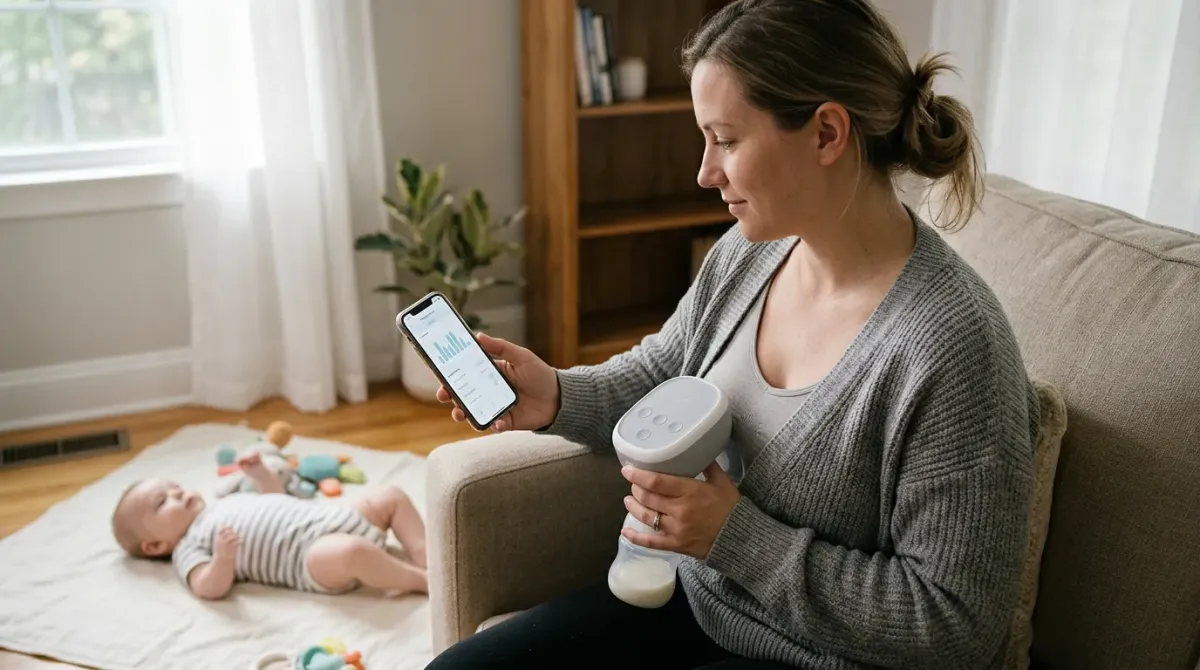
A breast pump removes milk from the breast. Some electric pumps connect to an app on a phone. The link is usually wireless. Depending on the product, the app may let you start or change a session, view session details, or keep a record over time.
Apps do not all work in the same way. One may record how long you pumped. Another may ask you to type in the amount collected. A pump may send some details to the app automatically. Read the product details carefully. Check which features work with your phone and in your country.
An app record is only a record of pumping. It does not measure how much milk your baby takes at the breast. It does not show how much milk your baby needs. A pump’s collected amount can also change from one session to another. Do not judge your supply from one session or a single app screen.
Do you need an app-connected pump?
Some parents find a digital record useful. It can help them remember when they pumped, especially when days are busy. A shared record may help a parent or carer plan expressed milk feeds. Some people prefer seeing their own notes in one place.
Other parents find app alerts or charts stressful. A pump that connects to a phone can add steps. You may need to charge the phone, pair the pump, allow permissions, and keep the app working. If you do not want to track sessions, a pump without an app may suit you better.
Think about what you need before you shop:
- Will you pump at home, at work, while travelling, or in several places?
- Do you want session times saved, or do you only need a pump?
- Would an app make the routine easier, or make you check numbers more often?
- Can you use the pump if your phone battery is flat?
- Can you use the pump if the app, internet, or Bluetooth is unavailable?
- Do you want to share records with another person or health professional?
There is no single right answer. Choose the simplest setup that meets your needs.
Start with comfort and fit
A pump’s breast shield, also called a flange, sits over the nipple. The nipple moves through its centre while the pump draws milk. A poor fit can feel uncomfortable and may make pumping harder. A shield that looks right on the box may not fit your body.
Follow the pump maker’s fitting guide. Your nipple should move freely in the tunnel. The shield should not rub or pinch. A large amount of the darker skin around the nipple should not be pulled far into the tunnel. Pain is a reason to stop and check the fit, suction, or technique.
Start with low suction. Increase it only to a level that feels comfortable. Stronger suction does not always remove more milk. Pumping should not hurt. If pain continues, or you notice damaged skin, ask a midwife, doctor, or lactation consultant for help.
Some pumps offer different shield sizes. Some sell inserts that reduce the tunnel size. Check which sizes are available and whether they can be bought separately. Ask whether the parts are made for your specific model. Do not assume parts from another pump will fit.
Choose a pump style for your routine
Electric pumps use a motor. A single electric pump works on one breast at a time. A double electric pump can pump both breasts during the same session if the model supports it. A manual pump uses hand pressure. Wearable pumps sit inside a bra, but their shape, weight, and controls vary.
Each style has trade-offs. A wearable model may be easier to carry, but it still needs to fit inside your clothing and be assembled correctly. A larger pump may be easier to control at home, but less handy to carry. A manual pump does not need a motor or phone connection, but it needs your hand to operate.
| Pump type | What may suit it | What to check |
|---|---|---|
| Manual | Occasional pumping or a simple backup | Hand comfort, cleaning, and how much effort each session takes |
| Single electric | Pumping one breast at a time | Power options, noise, controls, and the time your routine allows |
| Double electric | Pumping both breasts in one session when supported | Fit on both sides, included parts, and whether both sides can be adjusted |
| Wearable electric | Some routines that need a compact pump worn in a bra | Fit, weight, noise, capacity, cleaning, and ease of reaching controls |
| App-connected electric | People who want session records or phone controls | Which details are automatic, what needs manual entry, and how the pump works without the app |
This table describes general pump types. A product’s exact features depend on its maker and model. Do not assume every wearable or app-connected pump has the same performance.
What to check in the app
Before buying, look at the app’s current feature list. Check that the app is available in your country. Confirm that your phone can run it. Check the phone’s operating system requirements. An app that is no longer supported may stop working well after a phone update.
Find out what the app records. Does it save session start and finish times? Does it show pump settings? Does it record milk amounts automatically, or do you type them in? Is there a way to correct a mistake? Can you export or delete your records?
Check whether the pump needs the app to run. Some pumps can operate from buttons on the pump. Others may rely more heavily on a phone. A physical button can be helpful when your phone is charging or out of reach. Read the instructions for the exact model.
Ask what happens if the connection drops. Can you finish a session using the pump controls? Will the session record save later? Can you pump without making an account? These answers can help you avoid a setup that becomes hard to use.
Protect your account and personal information
A connected pump may collect personal information. This can include account details, session times, settings, or notes you enter. The exact information depends on the maker and app. Read the privacy notice before you create an account.
Look for clear answers to these questions:
- What information does the app collect?
- Why does it collect that information?
- Can you use the pump without sharing optional details?
- Can you delete your account and saved records?
- Does the app share information with other companies?
- How can you contact the maker about privacy or security?
Use a password you do not use for another account. Keep the app and phone updated. Only give the app permissions that make sense for its features. Turn off optional sharing if you do not want it.
Do not enter health details you do not need to share. If you keep notes about pain, milk amounts, or feeding plans, think about who can see them. A phone can be shared, lost, or replaced. Use its screen lock and account security settings.
Cleaning pump parts safely
Milk residue can remain on parts that touch milk. Clean the pump parts that contact milk after each use, following the maker’s instructions. Wash your hands before handling clean parts. Use a clean basin or sink area and let parts air dry fully on a clean surface.
Do not wash the motor or phone unless the instructions say they are safe to wash. Keep water away from electrical parts. Check whether the tubing needs cleaning. Some pumps keep milk away from the tubing. Other designs may need extra care if milk or moisture gets inside.
Check every part before pumping. Look for cracks, sticky areas, worn valves, or a damaged seal. Replace parts when the maker says to, or when they are damaged. Worn parts may affect how the pump works. Use only parts approved for your pump model.
Cleaning can take time. Before you buy, check how many pieces need washing and whether parts can be washed in a dishwasher. Follow the maker’s directions for any dishwasher use. A product listing may say “easy to clean,” but the instructions show the actual steps.
Store and handle expressed milk carefully
Clean hands and clean containers help protect expressed milk. Use containers made for storing breast milk or food. Label each container with the date and time, if that helps you use the oldest milk first. Follow current guidance from a trusted health service for storage times and temperatures.
Storage advice can differ with room temperature, fridge temperature, freezer type, and local guidance. Do not rely on an app timer as a safety check. The app cannot know whether milk stayed cold or whether a fridge lost power. If you are unsure whether milk is safe, ask a health professional or follow your local health service’s guidance.
Keep expressed milk away from direct heat. Do not microwave breast milk. A microwave can heat unevenly and create hot spots. If you warm milk, use a method recommended by your health service and check the temperature before feeding. Discard leftover milk according to local guidance.
The Australian Breastfeeding Association explains how to prepare expressed breast milk. The NHS also gives advice on storing breast milk. Use one trusted source for the country where you live, and ask your care team if your baby was premature or has health needs.
Use the pump record as a simple aid
A record can help you remember patterns. You might note the time, which side you pumped, how long you pumped, and any comfort concerns. If you choose to record an amount, remember that it can vary. One session does not give a full picture of your milk supply.
Do not let a chart set a feeding target by itself. Babies feed in different ways. Your baby’s age, health, growth, and feeding plan all matter. If you are worried about feeding, weight gain, wet nappies, or milk supply, speak with a health professional. An app cannot examine your baby or give a full assessment.
If a record helps, keep it brief. If it makes you anxious, stop tracking or hide the charts. You can return to notes later if you want. The goal is a routine that supports you, not a new source of pressure.
Age and feeding stages
Pumping needs can change as your baby grows and your daily routine changes. There is no fixed schedule that suits every family. Follow the feeding plan given by your care team, especially if your baby was born early, has a health condition, or needs help feeding.
| Stage | What may change | What to consider |
|---|---|---|
| Early weeks | You may be learning to feed, express, and care for a newborn at once. | Ask for help with fit and comfort. Keep the setup simple and easy to clean. |
| Returning to work or study | You may need to express away from home and store milk safely. | Check power, transport, storage, privacy, and time for cleaning. |
| Later infancy | Your baby’s feeding pattern may change over time. | Use your care plan and your baby’s cues. Do not treat app targets as medical advice. |
| Weaning or changing feeds | You may express less or stop, depending on your needs. | Ask a health professional how to make changes comfortably if you need support. |
These are broad stages, not a timetable. A midwife, doctor, or lactation consultant can help tailor a plan to you and your baby.
Buying checklist
Compare the full routine, not only the phone features. Check the cost of replacement parts and whether they are sold where you live. Check the warranty and who handles repairs. Read the cleaning instructions before you buy.
- Comfort: Are suitable shield sizes available? Can you adjust suction?
- Controls: Can you change settings on the pump itself?
- App: What does it record? Can you use the pump without it?
- Phone: Is your phone supported? Is the app available in your region?
- Power: Can you charge it where you plan to pump? Is battery use explained?
- Cleaning: How many parts touch milk? How are they washed and dried?
- Parts: Can you buy valves, seals, shields, and other parts later?
- Privacy: Can you understand the data notice and remove your records?
- Support: Can you reach the maker for instructions or a fault?
- Returns: What are the return rules for a pump that does not suit you?
Common mistakes to avoid
- Buying for the app alone. A useful app cannot make an uncomfortable pump comfortable.
- Assuming all amounts are measured. Some apps need you to enter amounts by hand.
- Using the strongest suction. More suction can cause pain. Choose a comfortable setting.
- Ignoring a poor fit. Rubbing, pinching, or pain means you should pause and check the fit.
- Skipping cleaning steps. Follow the instructions for every part that touches milk.
- Trusting a phone record as a health check. It cannot tell if your baby is feeding well.
- Assuming phone connection is always needed. Find out how the pump works when the app is unavailable.
- Buying unapproved spare parts. Use parts made for the pump model.
- Sharing account access widely. Keep personal feeding notes private unless you choose to share them.
Guidance in Australia, the UK, the US and Canada
Breast pump app features are not a substitute for feeding guidance. Ask a local health professional about expressing, milk storage, and feeding concerns. Official services can help you find advice that fits your country.
| Country | Useful official or recognised body | What it can help with |
|---|---|---|
| Australia | Australian Breastfeeding Association and Pregnancy, Birth and Baby | Expressing, preparing breast milk, and feeding support |
| United Kingdom | NHS | Expressing and storing breast milk, plus local health advice |
| United States | Centers for Disease Control and Prevention | Infant feeding information and safe handling guidance |
| Canada | Health Canada and the Canadian Paediatric Society | Infant feeding information and advice from local care teams |
For product recalls, check your country’s official recall service. In Australia, Product Safety Australia lists recalls. In Canada, Health Canada posts recalls and safety alerts. Check the maker’s notices too, especially for a connected product with an app or battery.
When to ask for help
Ask a midwife, doctor, or lactation consultant for help if pumping hurts, your nipple is damaged, or you are worried about milk supply. Ask for help if your baby is hard to feed, seems unwell, or you are concerned about weight gain or nappies. Seek urgent care for urgent symptoms.
If the pump becomes hot, smells burnt, has a damaged cable, or behaves oddly while charging, stop using it. Follow the maker’s safety instructions and contact the seller or maker. Do not open or repair electrical parts unless the instructions say you can.
Frequently asked questions
Does an app-connected pump increase milk supply?
An app connection does not by itself increase milk supply. The app may help you keep a record. Comfort, fit, feeding needs, and your health matter. Ask a lactation consultant or clinician for advice about supply.
Can I use an app-connected pump without the app?
It depends on the model. Some pumps have controls on the pump. Check the instructions before buying. Make sure you know whether basic pumping works when your phone is unavailable.
Does the app measure how much milk my baby drinks?
No. A pump app can only record information about pumping. It cannot measure milk taken directly at the breast. It also cannot tell whether your baby is getting enough overall.
Is a wearable pump right for everyone?
No single pump style suits everyone. A wearable pump may fit some routines, but its shape and weight may feel awkward for others. Check fit, comfort, cleaning, and controls before choosing one.
Should I pump at the highest suction setting?
No. Use a comfortable setting. Stronger suction can hurt and is not a guarantee of more milk. If pumping hurts, stop and check the fit and settings. Seek help if the pain continues.
Can I share my pump app account with my partner?
Check the app’s account rules and privacy notice. If you share access, the other person may see personal notes or records. Share only what you want them to see.
Can an app tell me when my baby needs a feed?
An app cannot know your baby’s needs. Use your care team’s feeding plan and watch your baby. Ask a health professional if you are unsure about hunger cues or feeding frequency.
What should I do if the app stops working?
Use the pump’s instructions to check whether it can run without the app. Check phone compatibility and the maker’s help page. Do not skip cleaning or safe milk handling while fixing a connection issue.
Disclaimer: This article provides general information only. It is not medical advice and cannot replace care from a qualified health professional. Ask your midwife, doctor, or lactation consultant about your needs and your baby’s health. BabyGearFinder may earn a commission from qualifying purchases. This does not affect our advice.
Sources
- Australian Breastfeeding Association – Preparing expressed breastmilk
- NHS Start for Life (UK) – Storing breast milk
- CDC – Infant formula preparation and storage
- Caring for Kids (Canadian Paediatric Society) – Feeding your baby in the first year
- Product Safety Australia – Recalls
- Health Canada – Recalls and safety alerts
Related guides
More Feeding & Baby Food →
App-Connected Breast Pumps: What to Know Before You Choose

Hands-Free Breast Pumps: How to Choose and Use One

Shopping Cart and High Chair Covers: Safety, Comfort, and What to Check
