











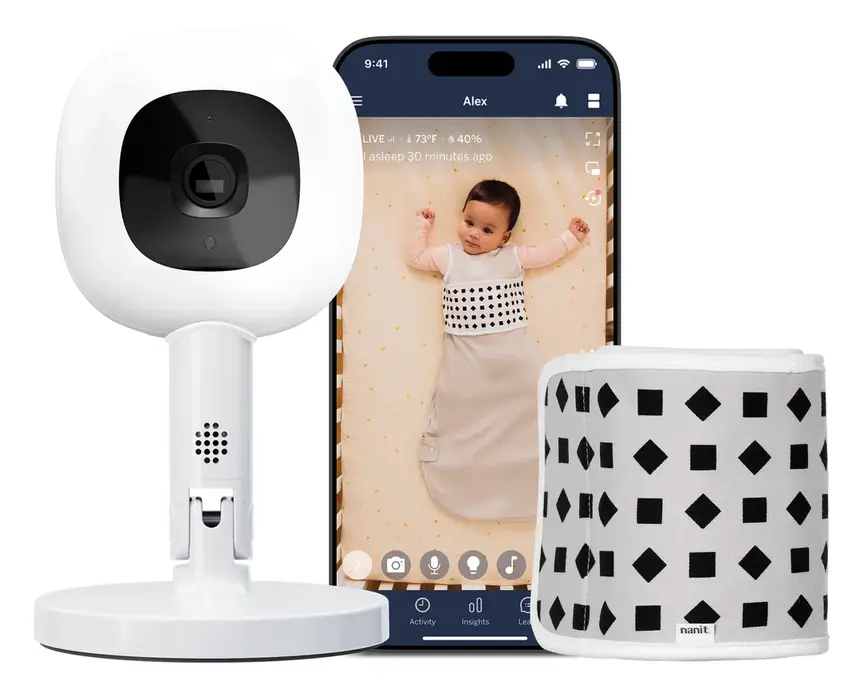
Quick answer
The Nanit Pro is worth it if you want to understand your baby's sleep, not just watch it. Its overhead 1080p view is the clearest way to see a baby in a cot, and with patterned Breathing Wear it can track breathing motion with no wires or sensors on your child. Sleep analytics are genuinely useful for spotting patterns and sharing with a partner or child-health nurse. The trade-offs: it relies on your home Wi-Fi and phone, the full analytics need a paid Insights subscription after the included period, and Nanit is a US company with limited local support in Australia. No monitor prevents SIDS — safe-sleep practices do. If you simply want reliable sound and video with no app or cloud, a closed-system monitor like the Infant Optics DXR-8 PRO is simpler and cheaper.
Buy it if
- Data-minded parents who want sleep trends
- Partners who both want to view on their phones
- Families with strong, reliable home Wi-Fi
- Parents who want breathing-motion alerts without wearables
Skip it if
- You want a dedicated parent screen with no app or cloud
- Your Wi-Fi is patchy in the nursery
- You do not want another subscription
- You expect a monitor to prevent SIDS (none can)
Why Nanit looks down instead of across
For decades baby monitors did one job: let you hear and, later, see your baby from another room. Nanit's founders came from computer vision, and they asked a different question — what if a camera could understand what it was seeing? Their answer was to mount the camera above the cot, looking straight down. From that bird's-eye angle, a camera can see the whole sleep surface, how long your baby sleeps, how often they wake and when you visit. It turns a nursery camera into a sleep diary that writes itself.
The Nanit Pro is the refined version of that idea. It records in 1080p HD, uses infrared night vision with no visible light in the room, and pairs with an app on your phone. Its most talked-about feature is breathing-motion monitoring: your baby wears a Nanit Breathing Wear band, swaddle or sleeping bag printed with a geometric pattern. The camera tracks the pattern as your baby's chest rises and falls. There are no electronics, batteries, wires or sensors on your baby — just fabric.
Nanit is clear that the Pro is a consumer monitor, not a medical device. That matters, and we will come back to it.
Features from Nanit and Australian retailer listings. Included subscription length differs between bundles and countries — check the box before you buy.
Sleep insights: what you actually learn
Most parents buy a Nanit for reassurance and keep using it for the data. Each morning the app summarises the night: when your baby fell asleep, how long they slept, how many times they woke and for how long, and how often an adult came into the frame. Over weeks, it shows trends — a later bedtime that is quietly shortening naps, or a feeding change that coincides with better nights.
For sleep-deprived parents this has real value. It replaces the fuzzy 3 a.m. memory of 'she was up all night' with something concrete you can share with a partner, a GP, or a maternal and child health nurse. Many families find that simply seeing that the night was better than it felt reduces stress.
The subscription question
The analytics live in Nanit Insights, a subscription. New cameras typically include an introductory period, and listings vary on how long that is. Without Insights you still get live video, sound, the breathing-motion feature and basic alerts; with it, you get history, sleep scores, trend reports and saved clips. Before you buy, look up current Insights pricing in your country and add two years of it to the camera price — that is the honest comparison against a monitor with no subscription.
Breathing-motion monitoring and SIDS: the honest truth
This is the most important section in this review. No baby monitor — camera, mat, sock or wearable — has been shown to prevent Sudden Unexpected Death in Infancy (SUDI), including SIDS. Red Nose Australia, the UK's Lullaby Trust and the American Academy of Pediatrics all say the same thing: what reduces risk is safe sleep. Back to sleep, face and head uncovered, a smoke-free environment, a safe cot with a firm, flat mattress, and sharing a room with your baby for the first six to twelve months.
So what is breathing-motion monitoring for? For many parents, it is reassurance — a way to sleep better themselves. Nanit's approach has a genuine advantage over wearables: nothing electronic touches your baby. But because it relies on the camera seeing the pattern, it works only when your baby is in view, wearing the Breathing Wear, and the Wi-Fi and app are working. Like any monitor, it can produce false alarms, and some parents find alerts increase rather than reduce anxiety.
If your baby was born premature, has a medical condition, or your doctor recommends monitoring, ask about a medical-grade monitor prescribed and supported by your care team. Do not use a consumer monitor as a substitute.
Set-up, Wi-Fi and everyday use
Set-up is straightforward if you choose the mounting option carefully. The wall mount gives the cleanest look and the most stable view, but you must route the power cable safely — keep every cord at least a metre away from the cot, use the cable covers, and check nothing can be reached from inside the cot as your baby grows and pulls up to stand. The floor stand is easier for renters and moving between rooms, but it needs space beside the cot. Nanit also offers a flex stand for travel.
Because the Nanit Pro streams over your home Wi-Fi, the quality of your network decides your experience. In a brick or double-brick Australian home, a nursery at the far end of the hall can have a weak signal. If your phone struggles in the nursery, test the signal before you buy, or plan a mesh Wi-Fi node nearby. When the internet goes down, check how your monitor behaves locally — this is the main reason some parents prefer closed-system monitors with a dedicated parent unit.
Phones as the parent unit
There is no dedicated parent screen; your phone (and your partner's) is the monitor. That is convenient — you can check in from work — but it also means your phone must be charged, on, and allowed to keep the app running in the background overnight. Many families set up an old phone or tablet as a dedicated night-time screen.
Privacy and security: questions to ask any Wi-Fi monitor
Any camera that streams video to the internet carries some privacy risk. Nanit uses account security and encryption, but you should still protect your side. Use a unique, strong password for the app, turn on two-factor authentication if offered, keep the app and camera firmware updated, and share access only with people you trust — and remove access when a nanny or relative no longer needs it.
If you would rather that no video ever leaves your home, choose a closed-system monitor with a dedicated parent unit that does not connect to the internet. You give up the analytics and remote viewing, but you gain simplicity and control.
What we love
- Overhead 1080p view shows the whole cot clearly
- Breathing-motion tracking with nothing electronic on baby
- Genuinely useful sleep analytics and trends
- Both parents can view on their phones, at home or away
- Neat wall mount; tidy cable management
- Polished, well-designed app
What to weigh up
- Relies on home Wi-Fi and a phone — no dedicated parent screen
- Best features need an Insights subscription
- Breathing Wear must be worn for breathing tracking
- US company: Australian support and warranty can be harder
- Not a medical device; no monitor prevents SIDS
Setting up the nursery around a Nanit (the safe way)
An overhead camera only works as well as the room around it, so it is worth planning the nursery with it in mind. Start with the cot. Red Nose recommends a cot that meets the Australian standard AS/NZS 2172, a firm, flat mattress that fits snugly, and nothing else in the cot — no pillows, bumpers, soft toys or loose bedding. Happily, that clean, uncluttered surface is also what an overhead camera sees best.
Position the camera directly above the cot, at the height Nanit specifies for the mount you are using, so the whole mattress is in frame. A slightly off-centre view is fine for video, but the analytics and breathing-motion tracking work best when your baby is clearly visible. Avoid pointing the camera towards a bright window; strong backlight makes daytime naps harder to see.
Plan for light and heat. Australian nurseries can swing from cold winter nights in Canberra and Hobart to sticky summer nights in Brisbane and Darwin. Red Nose's guidance is to dress your baby for the room, keep their head and face uncovered, and avoid overheating. Nanit's app shows room temperature and humidity — a genuinely useful nudge — but trust your hand on your baby's chest or back more than any number on a screen. In summer, choose the lightest Breathing Wear option and a sleeping bag with an appropriate TOG rating.
Getting Breathing Wear right
Breathing Wear comes in several forms: a band that wraps around your baby's middle, swaddles for newborns, and sleeping bags for older babies. Fit matters. Too loose and the pattern bunches, which can confuse the tracking; too tight and it is uncomfortable. Follow the sizing chart by weight, not age, and stop swaddling as soon as your baby shows signs of rolling — Red Nose advises arms-free sleeping once rolling begins.
Cords, again
We cannot say it too often: cords are the most common physical hazard of any baby monitor. Use the supplied cable covers, run the cable up and away from the cot, and re-check the set-up every time your baby reaches a new milestone. A baby who could not reach the wall last month may be standing and grabbing this month.
What a Nanit really costs over two years
Smart monitors are sold on the camera price, but you live with the total cost of ownership. A fair way to compare a Nanit Pro against a simpler monitor is to add up three things over two years: the camera bundle, any Breathing Wear you need as your baby grows, and the Insights subscription after the included period ends.
Breathing Wear is the cost parents most often forget. Babies outgrow sizes, swaddles give way to sleeping bags, and you will want at least two of whatever your baby is currently wearing so one can be in the wash. The subscription is the other variable. Check Nanit's current pricing in your country, and remember that prices for US-based services are often set in US dollars and can move with the exchange rate.
Against that, a closed-system monitor such as the Infant Optics DXR-8 PRO has one cost, once. If you only need to see and hear your baby, that difference can easily pay for a quality sleeping bag, a better cot mattress or a few months of nappies. If you will use the sleep insights every week, the Nanit's running cost buys you something real. The point is to decide with the full number in front of you.
The Nanit range: Pro, Plus and accessories
The Nanit Plus is the previous-generation camera. It uses the same overhead concept and app, and is often discounted. If you find one at a good price, it delivers most of the Nanit experience. The Pro adds the newer hardware and improvements. Breathing Wear comes in bands, swaddles and sleeping bags; for Australian summers, choose the lightest TOG suitable for your room temperature and follow Red Nose dressing guidance.
Nanit Plus Camera
Best for: The Nanit experience for less
Previous-generation overhead camera with the same app. Often discounted — a sensible way in if price is the barrier.
Nanit Pro vs Owlet, CuboAi and closed-system monitors
Smart monitors fall into three camps: overhead analytics cameras (Nanit), AI cameras with safety alerts (CuboAi), and wearables (Owlet). Then there are traditional closed-system monitors with a parent screen. Here is how they compare.
| What matters | Nanit Pro Camera | Owlet Dream Sock | CuboAi Plus Smart Camera | Infant Optics DXR-8 PRO |
|---|---|---|---|---|
| What it is | Overhead Wi-Fi camera with sleep analytics | Wearable sock (pulse and oxygen) | AI Wi-Fi camera with safety alerts | Closed-system video monitor + parent screen |
| On your baby | Patterned fabric only | Sock sensor on the foot | Nothing | Nothing |
| Needs Wi-Fi/app | Yes | Yes (base + app) | Yes | No |
| Subscription | Insights for full features | Optional premium features | Optional premium plan | None |
| Medical status | Not medical | Varies by country — check locally | Not medical | Not medical |
| Best for | Sleep data and trends | Parents wanting vital-sign readings | Covered-face / rolling alerts | Simple, private, reliable viewing |
Based on each manufacturer's published features. Medical clearance and product availability differ between Australia, the US, the UK and Canada.
Cheaper, simpler and different alternatives
Simple and private. The Infant Optics DXR-8 PRO and Eufy SpaceView Pro are closed-system monitors: a camera and a dedicated handheld screen on their own radio link. No app, no cloud, no subscription, and they keep working when the internet does not. For many families this is all they need.
AI safety alerts. CuboAi is widely sold in Australian baby stores and focuses on alerts such as a covered face or rolling, plus a cute, compact camera. If alerts matter more to you than sleep charts, compare it closely.
Wearable readings. Owlet's Dream Sock reads pulse and oxygen through a sock. Its regulatory status and availability vary by country, so check what is sold where you live, and remember the same SIDS caveat applies.

Infant Optics DXR-8 PRO
Best for: No app, no cloud, no subscription
Closed-system monitor with a dedicated parent screen and interchangeable lenses. Reliable, private and simple.

Eufy SpaceView Pro
Best for: Big screen on a budget
Large parent unit and pan/tilt camera on a closed link. Good value for straightforward monitoring.
CuboAi Plus Smart Camera
Best for: Covered-face and rolling alerts
AI camera popular in Australian stores, focused on safety alerts rather than sleep charts.


Owlet Dream Sock
Best for: Parents who want vital-sign readings
Sock-based pulse and oxygen readings. Check its status and availability in your country.
What to check in Australia, the US, the UK and Canada
There is no specific mandatory safety standard for baby monitors in Australia, but electrical and radio products must carry the RCM mark, which shows they meet Australian electrical safety and radio requirements. The cords are the main physical hazard: the ACCC warns that cords from monitors and blinds are a strangulation risk, so keep all cables well out of reach of the cot. In the US, monitors need FCC radio certification, and only products cleared by the FDA can make medical claims. The UK requires UKCA or CE marking; Canada requires ISED radio certification.
Your baby monitor checklist
- Decide what you needSound and video only? Sleep data? Breathing reassurance? The answer picks the category for you.
- Test your Wi-Fi in the nurseryStream a video on your phone in the nursery at night. If it stutters, fix the Wi-Fi or choose a closed-system monitor.
- Price two years, not day oneAdd subscription costs and Breathing Wear to the camera price.
- Plan the cord routeEvery cable at least a metre from the cot, secured with covers.
- Check local supportWho handles warranty and replacements in your country?
- Secure the accountStrong unique password, two-factor authentication, updates on.
- Choose sleepwear for your climateBreathing Wear comes in different weights; dress for the room temperature.
- Remember what it cannot doNo monitor prevents SIDS. Safe sleep does.
Mistakes to avoid
A monitor is not a reason to add bumpers, pillows or soft toys, or to put a baby to sleep on their tummy.
Monitor cables are a strangulation hazard. Mount high, use covers, and re-check once your baby can stand.
Plugs, power supplies, subscriptions and warranty may not transfer. Buy the version sold in your country.
If alerts wake you for nothing every night, adjust settings — constant alarms lead parents to ignore real ones.
Review who can see your nursery camera regularly, and remove old users.
Travel, siblings and how long you will use it
Most families use a baby monitor intensively for the first year or two, then occasionally until around school age. The Nanit's overhead design suits the cot years best; once your child moves to a big bed, the view and analytics become less useful, and many families move the camera to a playroom or retire it.
Travel. Nanit offers a flex stand for travel, and the Wi-Fi design means you can use it anywhere with a decent connection. But hotel and holiday-house Wi-Fi is often weak or behind a login page, which can make set-up frustrating. For travel, many parents prefer a small closed-system monitor or simply room-share, as Red Nose recommends for the first six to twelve months anyway.
Second baby. The app supports multiple cameras, so a second Nanit for a second nursery works smoothly. If you buy second-hand, make sure the previous owner has removed the camera from their account, reset it to factory settings and handed over all the parts, including the mount and cable covers. Check for any product recalls before using second-hand nursery products.
Resale. Smart cameras lose value faster than furniture because the software and subscription move on. Keep the box, mount and cable covers, and reset the camera before you sell or pass it on to protect your privacy.
Questions parents ask
Is the Nanit Pro worth it in Australia?
Does the Nanit Pro prevent SIDS?
Do I need the Nanit subscription?
Does Nanit work without the internet?
Is Breathing Wear safe for hot Australian nights?
Nanit vs Owlet — which is better?
Where should I mount the Nanit?
More in-depth reviews
 🪑 Highchairs & Booster Seats4baby Flat Fold Highchair Review7.5/10
 🪑 Highchairs & Booster Seats4baby Grow With Me Wooden Highchair Review7.8/10
 🚼 Prams & StrollersBaby Jogger City Tour 2 Review8.4/10
 🎠 Bouncers, Rockers & SwingsBabyBjörn Bouncer Balance Soft Review8.2/10
 🎠 Bouncers, Rockers & SwingsBabyBjörn Bouncer Bliss Review8.6/10
 🤱 Baby Carriers & WrapsBabyBjörn Carrier Hold Review8.0/10
Sources & how we checked
Specifications are taken from the manufacturer and major retailers and cross-checked; prices are typical RRPs and change often — the buttons show today's price. We do not invent star ratings or review counts.
- Nanit — Pro complete monitoring system
- Baby Village Australia — Nanit Pro (included Insights, AU listing)
- Real Homes — Nanit Pro review (specs)
- Babylist — Nanit Breathing Wear explained
- Red Nose Australia — Safe sleeping
- ACCC Product Safety Australia — Baby monitors & cord safety
BabyGearFinder earns a commission from qualifying purchases through retailer links, at no extra cost to you. It never changes our verdict.