









Parenting in the Digital Age: A Practical Guide to Baby Electronics
A plain guide to baby monitors, thermometers and other electronics, with simple tips on choosing devices, using them safely, and knowing their limits.
On this page
- What counts as baby electronics?
- Start with the task, not the product
- Baby monitors: what they can and cannot do
- Connected devices and privacy
- Thermometers and health readings
- Room devices: lights, sound, air, and heat
- Feeding and cleaning devices
- Phones, apps, and screen time
- Age stages and changing needs
- Quick comparison of common devices
- Electrical, battery, and cord safety
- How to check a device before use
- Advice in Australia, the UK, the US, and Canada
- Common mistakes to avoid
- Frequently asked questions
- Sources and further guidance
- Sources
Short answer: Baby electronics can make some tasks easier. A monitor can help you hear or see your baby from another room. A thermometer can help you check a temperature. A phone can help you keep notes or contact support. None of these devices can replace close care, safe sleep, or medical advice.
Choose a device for a clear need. Read its instructions before use. Keep cords and small parts away from your baby. Protect connected devices with a strong password. Ask a health professional when you are worried about your baby's health.
What counts as baby electronics?
Baby electronics include products that use power, batteries, sensors, or a phone app. Some are simple. Others connect to the internet and send information to a phone.
Common examples include:
- Audio monitors: These send sound from the baby's room to a parent unit.
- Video monitors: These send sound and pictures to a screen or phone.
- Wearable monitors: These attach to clothing or a baby's body. Some claim to measure movement, oxygen, or heart rate.
- Thermometers: These measure body temperature. Some use contact. Others read heat from the ear or forehead.
- Room devices: These include night lights, fans, humidifiers, air cleaners, and sound machines.
- Feeding devices: These include bottle warmers, breast pumps, and sterilisers.
- Phones and tablets: Parents may use them for calls, notes, health services, or baby apps.
These devices do not all solve the same problem. Start by naming the task you want help with. Then consider whether you need a device at all.
Start with the task, not the product
Advertising can make a device sound essential. Most families do not need every item on a baby list. A simple tool may be enough. Some tasks do not need a device.
Ask these questions before you buy or borrow one:
- What will this device help me do?
- Can I do that safely without it?
- Does it make a health claim?
- Who supports that claim?
- What happens if the battery dies or the connection drops?
- Can I use it without an app or internet connection?
- Can I keep cords, batteries, and parts away from my child?
- Will I know what to do if it gives an alert?
A monitor may help you hear a baby while you are nearby. It cannot make a sleep space safe. A phone app may record feeds. It cannot tell you if your baby is feeding well. A temperature reading can be useful. It does not explain the cause of a fever.
Keep care simple. Follow your local health service's advice. If you are unsure how to use a device, ask a pharmacist, nurse, doctor, or other qualified health worker.
Baby monitors: what they can and cannot do
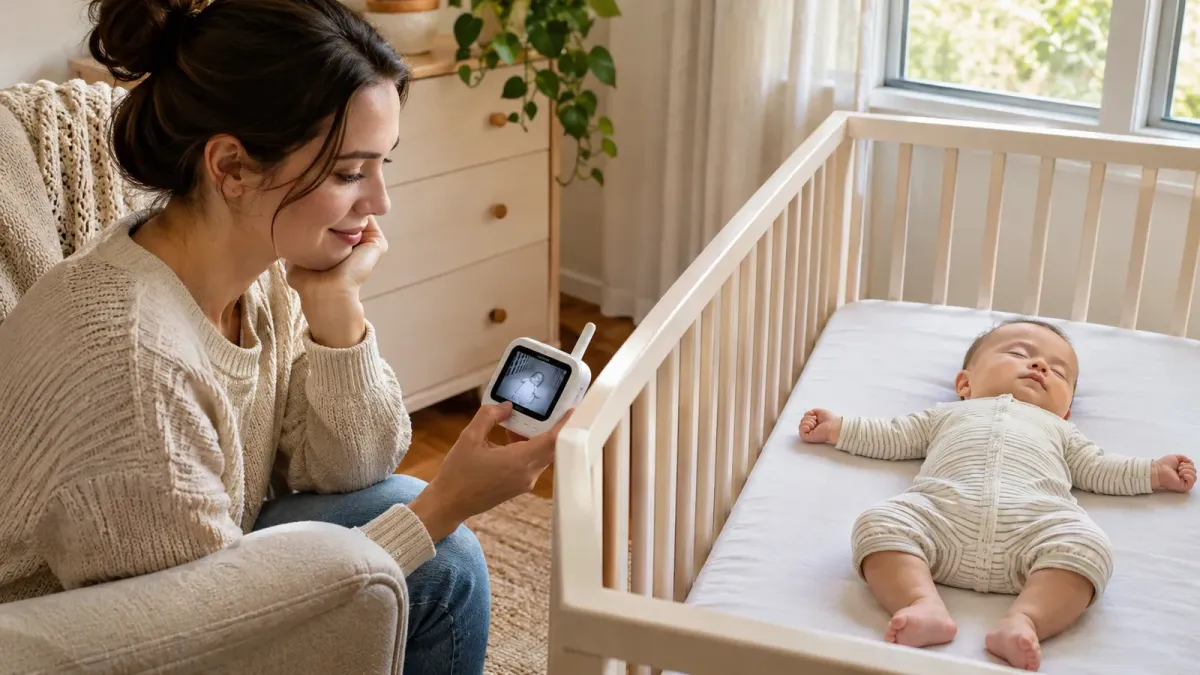
An audio monitor sends sounds from one room to another. A video monitor adds a picture. Some models use a parent unit. Others send video to a phone over a home network.
A monitor may help when you are in another part of the home. It can also help a parent with hearing needs. It does not watch your baby for you. You still need to check your baby in person.
A monitor does not prevent sudden infant death. It cannot make an unsafe cot safe. It cannot replace a clear sleep space, a firm and flat mattress, or placing your baby on their back. Follow safe sleep advice from your local health body.
Consumer monitors that claim to measure breathing, oxygen, or heart rate need extra care. A reading can be wrong or hard to understand. An alert may cause worry. A normal reading may give false comfort. The American Academy of Pediatrics says home monitors should not be used to lower sudden infant death risk in healthy babies. Ask your baby's doctor before using a medical monitor.
Choose a monitor for your home
Think about your rooms and daily routine. A basic audio monitor may meet your need. Video can help if you need to see the cot. It adds a screen and more settings.
- Check the maker's age and use instructions.
- See whether it needs Wi-Fi, an app, or an account.
- Check how the device works during an internet outage.
- Choose a place where you can hear alerts at a safe volume.
- Keep the camera and all wires well outside the cot and away from your baby's reach.
- Do not hang a camera or monitor over the cot.
- Test the device from places where you expect to use it.
- Make sure other caregivers know how it works.
Keep monitor cords at least one metre from the cot. Keep them farther away when possible. Secure spare cord so it cannot fall or be pulled into the sleep space. The cord must never cross a cot rail or hang near the baby. A child can become caught in a loop.
Connected devices and privacy
A connected monitor uses the internet or a home network. This can let you view a camera while away from home. It can also create a privacy risk if an account or network is not protected.
Use these basic steps:
- Change the default password before use.
- Use a long password that you do not use elsewhere.
- Turn on two-step sign-in when offered. This asks for another check after your password.
- Install updates from the maker.
- Use the official app store or the maker's website for downloads.
- Limit who can view the camera or account.
- Turn off remote viewing when you do not need it.
- Remove old users when a caregiver no longer needs access.
- Check how the company stores and shares video or sound.
Do not point a camera at areas where family members expect privacy. Tell visitors and caregivers when a camera is in use. If you sell or give away a device, remove your account and reset it first.
Choose products that receive security updates. Check how long the maker plans to support the device. If updates stop, consider disconnecting it from the internet. The Australian Government, UK Government, and Government of Canada each give advice about smart-device security.
Thermometers and health readings
A thermometer measures temperature. It does not diagnose an illness. Readings can differ by method and device. Follow the instructions for your thermometer.
Ask a health professional which method suits your baby's age. Do not compare readings from different types as if they were identical. If a reading seems wrong, repeat it as the instructions say. If your baby seems unwell, seek advice even when the reading looks normal.
Some wearable products claim to track oxygen, breathing, or heart rate. These are not a substitute for medical equipment or care. A consumer device may not be accurate enough to guide treatment. Do not delay urgent care while checking an app or waiting for an alert.
A fever in a very young baby can need prompt medical advice. Contact your local health service for guidance. Call emergency services if your baby is struggling to breathe, is difficult to wake, or seems seriously ill.
Room devices: lights, sound, air, and heat
Room devices can change light, sound, air flow, or moisture. Use them only for a clear reason. Keep every device and its cord away from the cot.
Night lights
A dim light can help an adult feed or change a baby. It does not need to shine into the cot. Choose a low light that lets you see safely. Turn it off when you no longer need it.
Keep lamps stable and away from fabric, bedding, and your baby's reach. A hot bulb or damaged wire can cause injury or fire. Follow the maker's safety instructions.
Sound machines
Some families use steady background sound. Keep the device well away from the cot. Set the sound as low as you can while still hearing it. Do not place speakers beside a baby's head.
A sound machine should not cover sounds that need your attention. Check that you can still hear your baby and household alarms. Turn it off if it is not helping.
Fans and heaters
A fan can move air around a room. It must be stable and out of reach. Keep its cord secured. Do not direct strong air at the baby. A heater can burn skin or start a fire. Keep it well away from the cot, curtains, and clothing.
Dress your baby for the room. Check their chest or back if you are concerned they feel too warm. Hands and feet can feel cooler than the body. Avoid adding devices or layers without a clear need.
Humidifiers and air cleaners
A humidifier adds moisture to the air. It does not treat the cause of a cough or breathing problem. Clean it as directed. Standing water and dirty parts can grow germs or mould.
An air cleaner does not remove every indoor air problem. Check what it can filter and how often its filter needs changing. Avoid products that make health promises without clear evidence. Never use a humidifier to manage a breathing emergency.
Feeding and cleaning devices
Bottle warmers, breast pumps, and sterilisers can save time. They still need careful use and cleaning. Follow the device instructions and advice for milk or formula.
Do not rely on a machine to make formula safe. Use preparation and storage advice from your local health service. Clean hands, clean equipment, and safe storage all matter.
For a bottle warmer:
- Use it on a stable surface, away from your baby's reach.
- Keep the power cord secured and dry.
- Check the milk temperature before feeding.
- Do not warm a bottle in a microwave. It can heat unevenly and burn a baby's mouth.
- Follow the maker's cleaning instructions.
For a breast pump, clean the parts that touch milk after use. Store expressed milk as your health service advises. If a part is cracked or damaged, replace it as the maker directs.
A steriliser does not replace washing. Clean bottles and parts first. Then use the device as instructed. Let parts dry and store them in a clean place. Ask a health worker if your baby needs extra care.
Phones, apps, and screen time
A phone can help you call for advice, track appointments, or record feeds. It can also interrupt rest and time together. Keep it nearby for useful tasks. Give your baby your attention during care and play.
Choose apps with a clear purpose. Check who made the app and what information it collects. Do not enter sensitive health details unless you understand how they are stored. An app is not a doctor. It cannot examine your child.
For babies, talking, singing, cuddling, and floor play matter more than screens. A video call with family can help you stay connected. Avoid using screens to replace play, feeding, or comfort.
Raising Children Network in Australia advises limiting screen use for children under two, apart from video calls. The Canadian Paediatric Society also gives screen guidance for young children. Follow current advice where you live. Ask your child's health professional if you have concerns.
Age stages and changing needs
There is no fixed electronics list for every age. Your needs change as your baby grows. Keep checking that each device has a useful purpose and remains safe.
| Stage | Possible useful devices | What to keep in mind |
|---|---|---|
| Before birth | Phone, basic thermometer, audio monitor if needed | Set up accounts and learn instructions before sleep loss begins. |
| Newborn months | Monitor, thermometer, feeding equipment | Keep cords away from the cot. Ask a health worker about readings. |
| Rolling and reaching | Fewer new devices may be needed | Move cords and small parts beyond reach. Recheck the room. |
| Crawling and standing | Phone for calls or notes, child-safe room devices | Secure devices and cords. Keep batteries and chargers out of reach. |
| Toddler years | Occasional calls, room light, thermometer | Keep screens brief and shared. Teach simple device rules. |
Age labels do not replace supervision. A device that was out of reach last month may be reachable now. Recheck cords, plugs, batteries, and furniture as your child gains new skills.
Quick comparison of common devices
| Device | What it can help with | Limits | Main safety check |
|---|---|---|---|
| Audio monitor | Hearing sounds from another room | Does not watch or protect the baby | Keep cords far from the cot. |
| Video monitor | Seeing the room from another place | Picture may freeze or connection may fail | Secure camera and protect the account. |
| Wearable health monitor | May show a reading for a chosen measure | Can be inaccurate and cause false alarm or comfort | Ask a doctor before relying on it. |
| Thermometer | Checking body temperature | Does not explain why a baby is unwell | Use the method as instructed. |
| Night light | Helping an adult see during care | Not needed for the baby to sleep | Keep it stable, cool, and away from fabric. |
| Sound machine | Adding steady background sound | May hide sounds or be too loud | Keep it distant and quiet. |
| Bottle warmer | Warming milk in a controlled way | Does not make unsafe milk safe | Check temperature before feeding. |
| Phone app | Notes, reminders, or video calls | Cannot assess health or replace care | Check privacy and limit screen use. |
Electrical, battery, and cord safety
Electronics add cords, plugs, chargers, and batteries to a home. A baby can pull, chew, or reach them sooner than expected. Set up devices with your child's future reach in mind.
- Keep cords away from cots, beds, and play spaces.
- Do not use a device with a damaged cord, plug, battery, or case.
- Keep chargers and power boards out of reach.
- Use only the charger supplied or approved by the maker.
- Do not charge a device on bedding or under a pillow.
- Keep button batteries and spare batteries locked away.
- Dispose of batteries safely. Do not leave them in a drawer a child can open.
- Follow the maker's advice about charging and heat.
Button batteries can cause severe internal injury if swallowed. Keep devices with loose or easy-to-open battery covers away from children. If you think a child has swallowed a battery, seek emergency help at once. Do not wait for symptoms.
How to check a device before use
A short check can prevent common problems. Read the full instructions, including cleaning, charging, and age limits. Check for recalls before using second-hand gear.
- Check the purpose. Write down the task you expect the device to do.
- Check the maker. Find the maker's contact details and support information.
- Check the parts. Look for damage, loose covers, sharp edges, or exposed wires.
- Check the room. Place the device where a child cannot reach it.
- Check alerts. Learn what each light, sound, or message means.
- Check failure plans. Know what to do if power, Wi-Fi, or the battery stops.
- Check cleaning. Follow the instructions and allow parts to dry.
- Check again as your child grows. Move devices when your child can reach or pull them.
Do not change a device or use it in a way the maker does not allow. Do not cover vents or sensors. Stop using it if it becomes unusually hot, smells burnt, or behaves strangely.
Advice in Australia, the UK, the US, and Canada
Parents can check local product alerts and health advice. Agency names differ. The basic questions stay the same: Is the device suitable? Is it recalled? Does it make a claim that needs medical advice?
| Country | Product safety body | Useful health or child safety guidance |
|---|---|---|
| Australia | Product Safety Australia, run by the Australian Competition and Consumer Commission (ACCC) | Red Nose and Pregnancy, Birth and Baby provide baby sleep and care guidance. |
| United Kingdom | Office for Product Safety and Standards (OPSS) | The NHS and The Lullaby Trust provide baby health and sleep guidance. |
| United States | Consumer Product Safety Commission (CPSC) | The American Academy of Pediatrics provides child health guidance through HealthyChildren.org. |
| Canada | Health Canada | The Canadian Paediatric Society shares parent guidance through Caring for Kids. |
Check the recall service for your country. A product sold online may come from another country. Check its instructions and support details before buying. Do not assume that a foreign product meets local rules.
Common mistakes to avoid
- Treating a monitor as a safety system. Keep following safe sleep advice and check your baby yourself.
- Trusting every app reading. Consumer readings may be wrong. Ask a health professional about health concerns.
- Putting cords near the cot. Keep all cords well outside the sleep space and secured.
- Leaving default passwords in place. Change them and limit account access.
- Using a device without reading its instructions. Learn how to clean, charge, and store it.
- Buying too much before birth. Wait until you know which tasks are hard for your family.
- Using a screen as a constant distraction. Make time for talking, holding, and play.
- Assuming a device replaces supervision. Stay close during feeding, bathing, and play.
- Ignoring recalls or updates. Check alerts and update connected devices.
- Keeping damaged electronics in use. Stop using a device with heat, damage, or odd behaviour.
Frequently asked questions
Do I need a baby monitor?
No. Many families do not need one. It may help if you spend time in another room or need sound support. It does not replace supervision or safe sleep.
Can a monitor prevent sudden infant death?
No consumer monitor is proven to prevent sudden infant death. Use safe sleep advice from your local health service. Ask a doctor before using a medical monitor.
Are wearable oxygen monitors safe to rely on?
Do not rely on a consumer wearable to judge your baby's health. Readings can be wrong. Speak with your baby's doctor before using one for health decisions.
Where should I put a monitor camera?
Put it on a stable surface or mount it as the maker directs. Keep it and every cord outside the cot and beyond your baby's reach. Never hang it over the cot.
Should I use a sound machine all night?
It is optional. If you use one, keep it far from the cot and set it quietly. Turn it off if it stops you hearing your baby or alarms.
Can I use my phone during feeds?
You can use it for a useful task or a video call. Put it aside when you want to watch your baby, respond to cues, or enjoy time together.
What should I do if a monitor stops working?
Check power, battery, and connection using the instructions. Go and check your baby in person. Do not assume the monitor is still watching the room.
How often should I check connected devices?
Check for maker updates when you receive an alert or use the app. Review users and privacy settings from time to time. Replace or disconnect devices that no longer get security support.
When should I call for medical help?
Call your local health service if your baby has a fever or seems unwell. Get urgent help for trouble breathing, poor response, or other severe signs. Do not wait for an app alert.
Sources and further guidance
- Red Nose Australia: Baby monitors
- Raising Children Network: Screen time for babies and toddlers
- UK Office for Product Safety and Standards
- Children's Hospital of Philadelphia: Consumer baby monitors
- Government of Canada: Cyber security tips for baby gear
- Australian Government: Security standards for smart devices
- UK Government: Security rules for smart devices
- U.S. CPSC: Video baby monitor cord recall
This article is general information, not medical advice. Follow your local health service's guidance and speak with a qualified health professional about your baby's needs. Some links may be affiliate links. BabyGearFinder may earn a commission if you buy through them, at no extra cost to you.
Sources
- Red Nose Australia – Baby monitors
- Raising Children Network – Screen time: babies and toddlers
- UK Office for Product Safety and Standards
- Children's Hospital of Philadelphia – Consumer baby monitors have little proven benefit for healthy infants (2017)
- Get Cyber Safe (Government of Canada) – Cyber security tips for your baby gear
- Australian Department of Home Affairs – Security standards for smart devices
- UK Government – Security rules for smart devices (PSTI)
- U.S. CPSC – Strangulation deaths prompt recall of video baby monitors with cords (2011)
Related guides
More Parental Tips →
Stylish and Safe Baby Gear: A Practical Guide for Modern Mums and Dads

Helping Your Baby Sleep Through the Night: A Simple, Safe Guide

From Breast Milk to Solids: A Simple Guide to Feeding Your Baby